






Go to Slither.io. You can do this by typing "slither.io" into your search bar or URL bar. You can also download the game from the Google Play Store or the App Store.

Click "Change Skin". It is at the bottom left-hand corner.

Click "Build a Slither". You'll find it at the bottom right-hand corner.
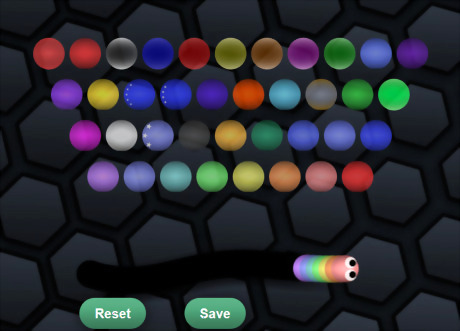
Look at the colors and patterns. Click on the one you'd like to include in your slither the most. Whichever one you click first will be that of your snake's head. Furthermore, the next color/pattern you click will be that of the next bit of your snake. If your sequence is repeated, you don't need to continue clicking on it in order for it to appear on your snake. Simply enter it once and it will be repeated on the rest of your snake.

Click "Save" once you are happy with it. If you still think you need to make changes, press the "Reset" button and start over.

Click "Save" again.

Click "Play" to see your unique snake in action. You can go back and change your slither any time.









Comments
0 comment